

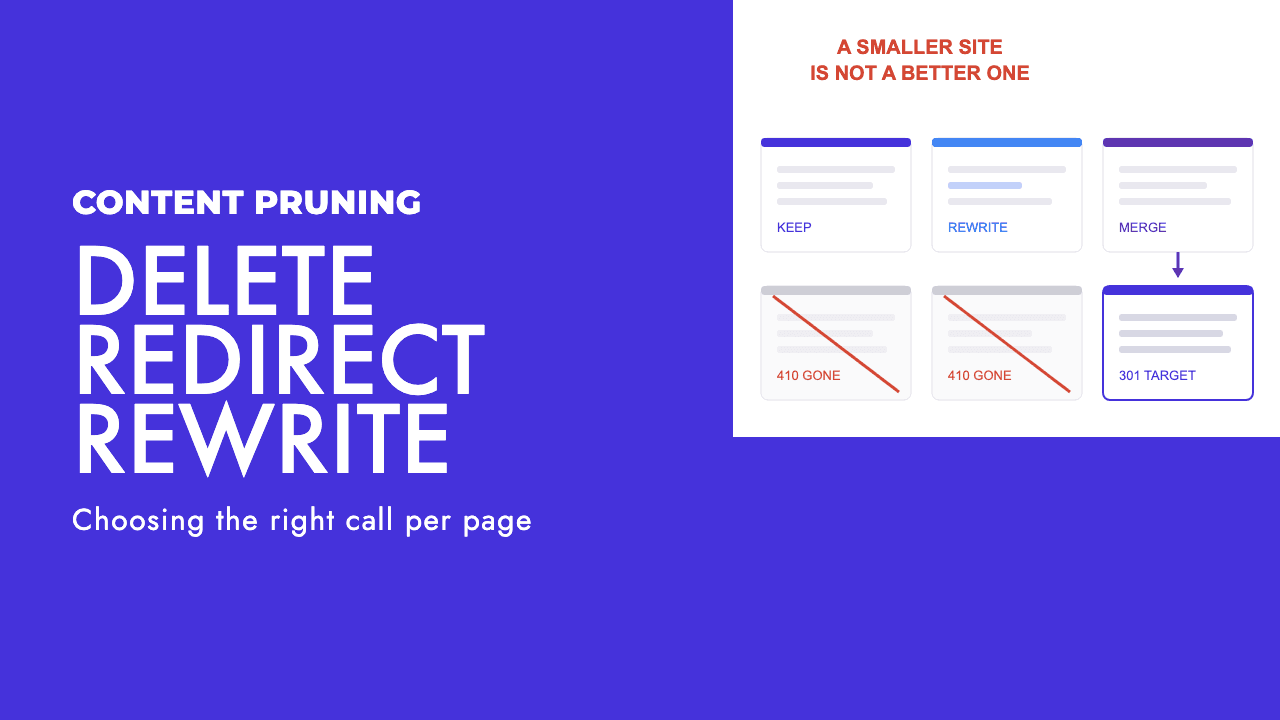
Somebody exports a list of every blog post with zero clicks in the last twelve months, sorts it by publish date, and asks whether they can delete the bottom 200. That spreadsheet is where most content pruning projects start, and it is the wrong place to start.
Our position, stated plainly: pruning is maintenance, and it is a poor ranking lever. Deleting pages does not transfer their strength to the pages you keep, and shrinking a site does not raise its quality. The defensible reasons to remove a page are that it is wrong, it duplicates something better, or nobody can maintain it.
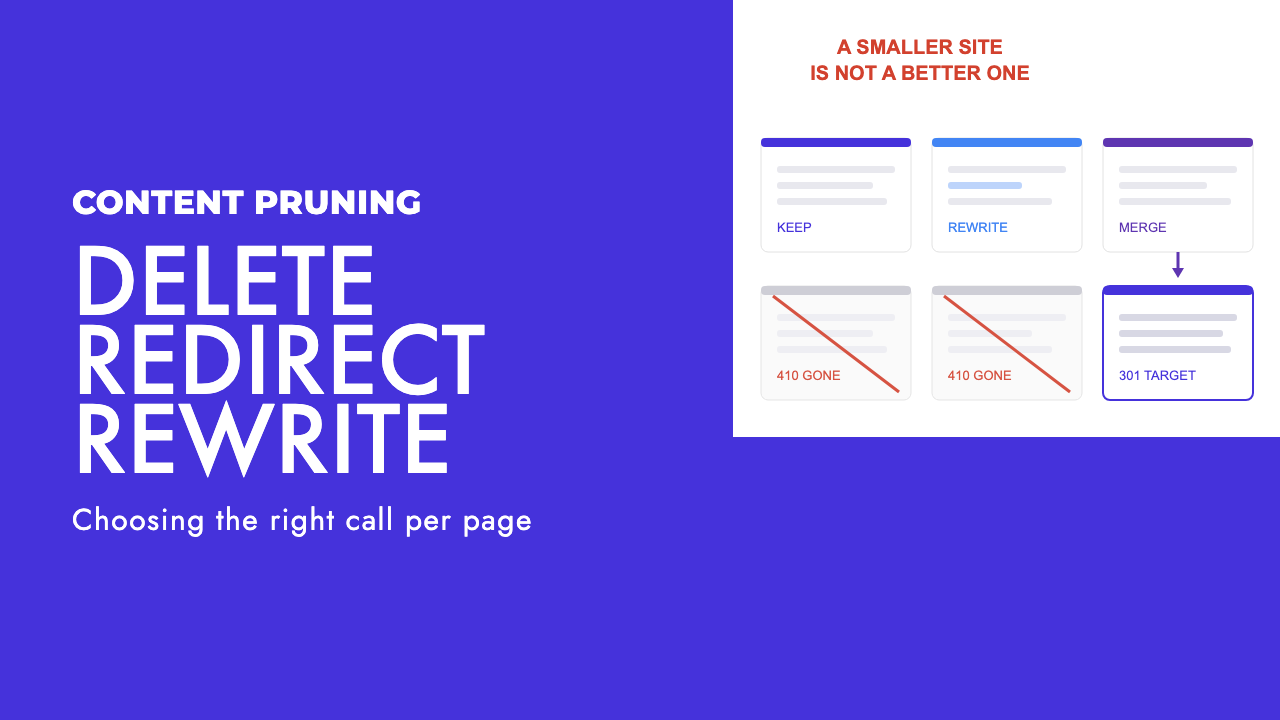
What pruning fixes, and what it does not
Google has been consistent on this for years. On 11 November 2026, John Mueller answered an indexing question on Bluesky with the line "Just making the site smaller doesn't significantly raise the overall quality of the site" (Search Engine Roundtable).
He said much the same in September 2023: "keep in mind that removing content doesn't make the rest rank higher" (Search Engine Roundtable).
Those two sentences undo the main sales pitch for pruning, which is that weak pages drag down strong ones and cutting them releases the handbrake. A post that earns nothing is earning nothing. It is not sending a bill to your service pages.
What pruning does fix is real, and smaller. It removes advice that is now incorrect. It stops two of your own pages competing for one query. It cuts the list of things someone has to keep accurate, which matters a lot when the marketing team is one person.
Google's own core update guidance goes further than most agencies do. It calls deleting content "a last resort", to be considered only if the content cannot be salvaged, and adds that if you are thinking about deleting whole sections, that is probably a sign they were written for search engines first (Google Search Central).
Build an inventory before a delete list
A content audit is a join, and the delete list is the last thing it produces. We put four things side by side for every URL.
- A crawl of the site, so you know what exists, what links to it internally and what status code it returns.
- Search Console page data for that property, which shows the queries each URL appears for.
- Analytics, because some pages get no search traffic and still do a job in email, sales calls or referrals.
- A human read of the page itself.
The fourth one is the step people skip, and it is the only one that answers the question. Open the page. Is it correct? Would you be comfortable if a customer quoted it back to you? Does another page on the site say the same thing better?
Low traffic and an old publish date are not answers to any of those. When a round of publishers started deleting archives in 2023 on the theory that Google dislikes old content, Danny Sullivan's reply was "That's not a thing! Our guidance doesn't encourage this. Older content can still be helpful, too" (Search Engine Roundtable).
Mueller, in the same coverage, said that "regular maintenance and cleaning up is always good", then added: "Just don't assume that deleting something only because it's old will improve your site's SEO magically."
So the numbers tell you where to look, and the read tells you what to do. A dashboard filter cannot tell the difference between a post nobody needs and a post about a narrow topic that three good prospects a year find and act on.
The four outcomes for every page
Every URL in the inventory ends up in one of four places. We decide in this order, because the earlier outcomes preserve more than the later ones.
| Outcome | The test | What to do |
|---|---|---|
| Keep as is | Accurate, still describes what you do, no better version on the site | Nothing, apart from checking it is linked from somewhere sensible |
| Rewrite in place | The topic is worth covering but the page is thin, dated or generic | Rewrite on the same URL, update the modified date honestly, keep the slug |
| Consolidate | Two or more pages answer the same question, or one page is a weaker subset of another | Move the useful parts into the stronger page, 301 the others to it |
| Remove | Wrong, unmaintainable, off topic for the business, or made only to rank, with no close equivalent | Take it down and let the URL return a 404 or 410 |
In the archives we work on, the second and third rows are where most of the pages land, and the fourth is the shortest list. That is opinion from doing this, and your archive may differ, but the reasoning holds either way: a rewrite keeps the URL and a redirect keeps the links. Removal keeps neither.
The consolidate row is also where overlapping posts get resolved. If your audit keeps turning up pairs of posts chasing the same query, our guide to finding and fixing keyword cannibalisation covers how to pick the survivor.
Consolidating without throwing away the links
Consolidation done badly is deletion with extra steps. The common mistake is to redirect five old posts to a sixth and change nothing on the sixth, so anything useful in the five is gone and the redirect points at a page that does not answer what the old URLs answered.
Do it in this order. First, read the pages you are retiring and lift what is worth keeping: the worked example, the paragraph that answers a specific question, the table. Put that into the surviving page so it is better than any of them were alone.
Then redirect. Google's canonicalisation documentation lists redirects as a strong signal that the target should become canonical, ahead of sitemap inclusion, which it describes as a weak one. It recommends server-side redirects for the quickest effect (Google Search Central).
The same document recommends that the surviving page carries a self-referential canonical, written as an absolute URL. Check that, because a consolidated page still pointing its canonical at an older version of itself is a mess we see more often than we should.
Last, update internal links so they point straight at the survivor, and run the old URLs through a redirect checker to confirm each one resolves in a single hop to the right place.
One rule limits all of this. A redirect only makes sense when the destination is a close equivalent. Pointing a retired post about one topic at the blog index, or at the homepage, tells the visitor nothing and gives Google a redirect to a page that does not match. If there is no close equivalent, the page belongs in the remove row.
Removing a page properly
When a page has to go, let it go cleanly. Delete it or unpublish it and make sure the URL returns a 404 or a 410.
Google's documentation says all 4xx errors except 429 are treated the same: the URL is removed from the index if it was there, and crawling of it gradually slows (Google Search Central). Mueller has said Google often confirms a 404 before dropping the URL and tends to do that faster with a 410, while adding that "in practice, the difference is very small" and that it is "not critical to use a 410" (Search Engine Roundtable). Use whichever your CMS produces without a fight.
Noindex is the tool people reach for instead, usually because it feels reversible. For a page you are retiring, it is the wrong one. Google's crawl budget guide advises against it for removed pages because Google will still request the page and only then drop it (Google Search Central). You also keep a live page on the site that somebody has to remember exists.
Noindex has proper uses, and we set out which directive fits which job in robots.txt vs noindex vs canonical. Retiring content is not one of them.
The Removals tool in Search Console is for emergencies: a page that exposes something it should not, and has to be out of results today. Google's help page says a successful request lasts only about six months and calls the tool "only one step" towards permanent removal (Search Console Help). It is not a housekeeping tool, and using it on a list of old blog posts achieves nothing the 404 would not.
The AI content pile
There is one case where removal is the main move. If a site published a large batch of generated posts over the last two years with the aim of collecting rankings, most of that batch cannot be rewritten into something worth having, because there was never a point of view or any experience underneath it.
Google's spam policies define scaled content abuse as generating many pages "for the primary purpose of manipulating search rankings and not helping users", and describe it as typically large amounts of unoriginal content with little to no value, "no matter how it's created" (Google Search Central). The method is beside the point. The purpose is the test.
Google's helpful content guidance turns that into a question you can ask of each post: "Is the content primarily made to attract visits from search engines?" It frames the wider check as who made the page, how, and why (Google Search Central).
Our advice is to split the pile in two. Rewrite what a person in the business can defend, meaning they would put their name on it and can add what the draft lacked. Remove what was only ever made to rank.
And do not expect the removal itself to lift anything. Taking the pages down ends a liability. It does not create an asset, and Mueller's two lines above apply here as much as anywhere. We covered how Google has been enforcing this in our write-up of the June 2026 spam update and scaled content abuse.
Crawl budget is not your reason to prune
The other argument for cutting pages is crawl budget: fewer URLs, so Google spends more time on the good ones. For the sites our readers run, this does not apply.
Google's crawl budget guide says who it is for. Large sites with more than a million unique pages and content changing about weekly. Medium or larger sites with more than 10,000 unique pages and content changing daily. And sites where a large share of URLs sit in the "Discovered, currently not indexed" status in Search Console.
Google calls those numbers a rough estimate, not exact thresholds, and says that if your pages tend to be crawled the same day they are published, you do not need the guide at all. A 300 post blog on a business site is nowhere near any of this.
Mueller made the related point in the November thread, describing crawl budget and overall site quality as "very distinct things". If Google is indexing very little of a small site, his reading was that it points to a severe technical problem or to Google not being convinced by the site overall. Neither is solved by having fewer URLs.
How to tell whether it worked
Measure at page level. For each rewritten or consolidated page, compare the queries it appears for and the clicks it earns before and after, over a long enough window that one good week does not fool you. For redirected URLs, confirm they have dropped out of the index and the survivor has picked up their queries. For removed URLs, confirm they return a 4xx and have stopped being crawled as often.
Then be honest about where the effect is. In our experience it shows up on the pages you improved, and the site average barely moves. That is what you would expect if pruning is maintenance: the gain comes from the rewriting and merging, and the deleting only tidies up behind it.
If the archive is big enough that sorting it feels like a month you do not have, that sorting is a large part of our content strategy work. A free SEO review will tell you whether your archive needs it at all, or whether the problem sits somewhere else.
Frequently asked questions
Does deleting old blog posts improve SEO?
Not by itself. Google's John Mueller has said that removing content does not make the rest rank higher, and Danny Sullivan has said that deleting posts because they are old is not something Google's guidance encourages. Delete a post when it is wrong, duplicated by a better page, or impossible to maintain. Age and low traffic are prompts to open the page and read it, not reasons to remove it.
Should I delete, redirect or noindex a page I no longer want?
If a close equivalent exists, move anything useful into it and 301 redirect the old URL there. If nothing equivalent exists, remove the page and let the URL return a 404 or 410. Noindex is the wrong tool for retirement, because Google still has to request the page before dropping it, and you are left maintaining a page you have already decided nobody should see.
Is a 410 better than a 404 for removed content?
Barely. Google's documentation treats all 4xx responses except 429 the same way: a previously indexed URL is removed from the index and crawled less often over time. John Mueller has said Google tends to confirm removal faster with a 410, while calling the practical difference very small. Use whichever your CMS makes easy, and make sure the page does not return a 200 with a not found message.
What should I do with AI-generated posts that are not performing?
Read them first. Rewrite the ones a person in your business can stand behind, adding the experience and detail the draft never had. Remove the ones that only ever existed to catch a search query, because that is the pattern Google's scaled content abuse policy describes. Do not expect the removal itself to lift the rest of the site. The gain comes from the pages you improve.