
Interaction to Next Paint has turned up as "poor" in Search Console, or a developer has flagged it, and someone wants a speed project. Before you buy one: most sites do not have an INP problem, and the ones that do almost never have a slow site.
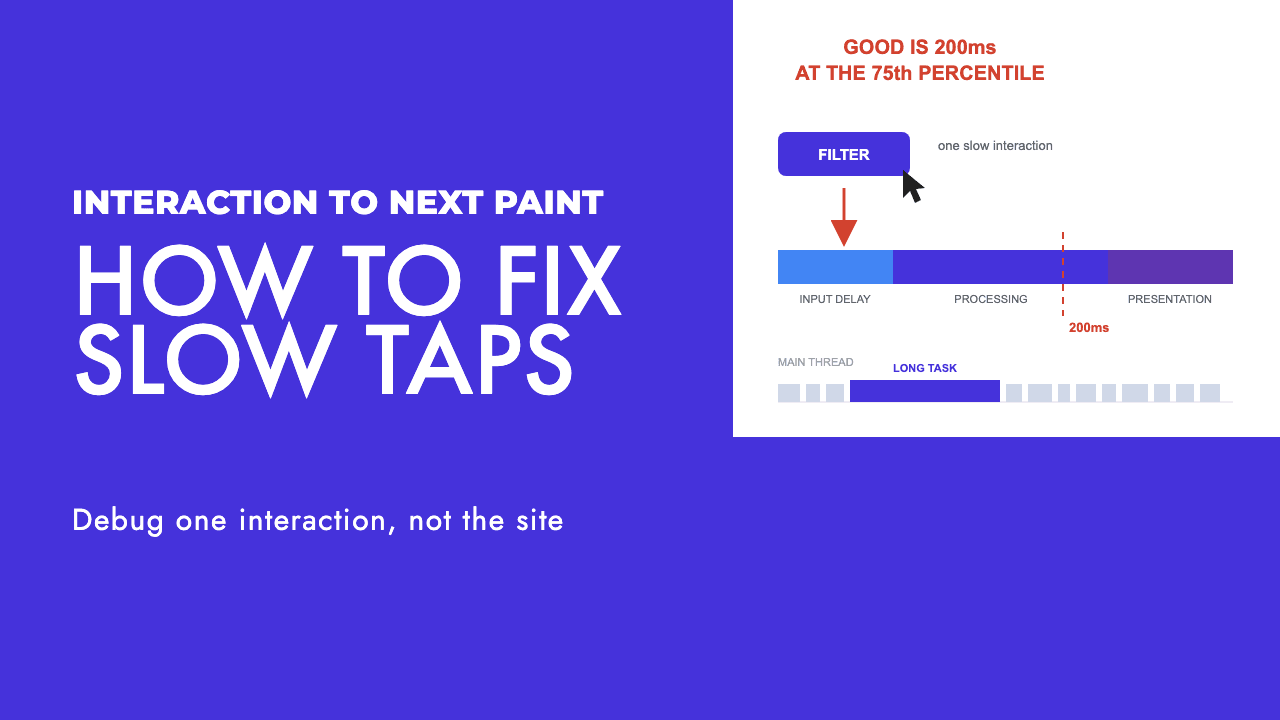
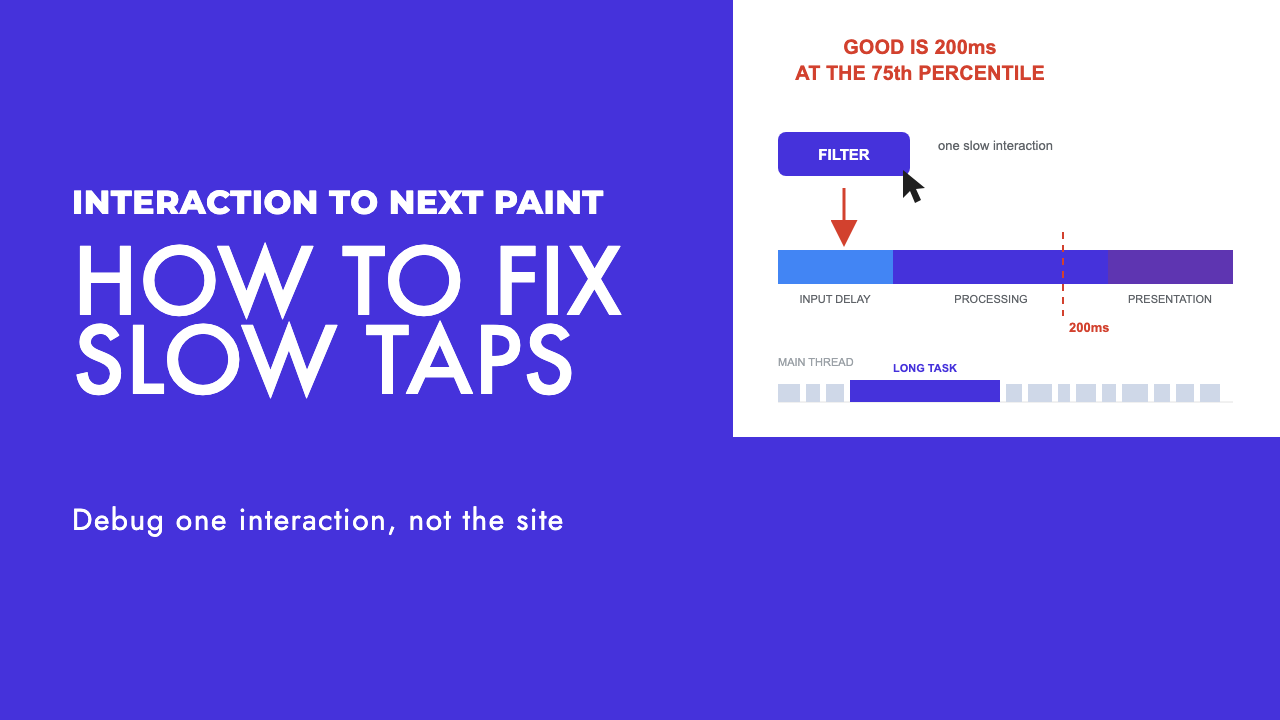
They have one slow interaction. A product filter, a mobile menu, an add-to-cart button, a search box, a consent banner. Fixing it means finding that element and reading which part of its timing is broken, in that order.
What INP measures, and what it ignores
INP "assesses a page's overall responsiveness to user interactions", in Google's words at web.dev. It counts mouse clicks, touchscreen taps and key presses, physical or onscreen. It does not count scrolling, hovering or zooming.
The thresholds sit at the 75th percentile of real page loads, split by mobile and desktop: 200 milliseconds or less is good, above 200 up to 500 needs improvement, above 500 is poor.
The detail that changes how you debug it is which interaction gets reported. The value is the longest interaction observed on the page, with outliers ignored (one highest interaction dropped for every 50). So a page where 40 buttons respond instantly and one filter takes 900 milliseconds has an INP of roughly 900. The worst thing a real person tapped is the score, which is why "make the site faster" is the wrong brief. You are hunting one element.
First, check whether you have a problem at all
The default assumption should be that you are fine. The Web Almanac's 2025 performance chapter, built on July 2025 data, has 77% of sites with good INP on mobile, up from 74% in 2024, and 97% on desktop. If you have not seen field data saying otherwise, there is nothing to fix yet.
Field data means the Chrome UX Report, and the easiest place to see it is the Core Web Vitals report in Search Console. Google's documentation for that report explains several things people misread.
The data comes from CrUX, real anonymised Chrome users, gathered whether or not a URL is in a Search Console property. The group INP figure is the value that 75% of page requests achieved or beat in the last 28 days. URLs are grouped by similar user experience, so the status belongs to the group and an individual URL inside it can differ. If a group lacks enough data, Search Console falls back to a broader origin group. Only indexed URLs can appear, and the report is a sample.
Two consequences. If your site is small, the "poor" label may be an origin-level fallback that says little about the page you are staring at. And a lab run cannot tell you your INP, because it only measures what the test script interacts with, which is often nothing. If the field number is good, you do not have a problem. If it is poor, the lab run will not tell you where.
Reading the field data before anyone refactors is part of any technical website audit we run.
Find the interaction, not the page
Search Console tells you a group of URLs is slow, not which element. For that you need attribution, and there are two practical routes.
The first is real user monitoring with the web-vitals library, currently on version 5. Its attribution build (web-vitals/attribution) attaches an attribution object to the INP metric with interactionTarget (a selector for the element the user first interacted with), interactionType ('pointer' or 'keyboard'), loadState (whether the page was still loading), and the three phase timings: inputDelay, processingDuration and presentationDelay. It also carries longAnimationFrameEntries, a longestScript summary, and totals for script, style and layout, paint and unattributed time.
Send that object to your analytics and you get a list of selectors, each with its phase split, instead of an argument about which page is slow. In our experience the list is short. The same three or four elements dominate.
The second route is local, for when you already suspect an element. The Chrome DevTools Performance panel captures LCP and CLS as soon as you open it and adds INP once you interact with the page, including for client-side soft navigations in single-page apps. The Interactions tab lists every captured interaction with its element, timings and phases.
Under Next steps > Field data you can connect CrUX and map a development origin to a production origin, so the panel shows your local number next to what real users get. The gap almost always comes down to the tags that are not loaded on staging.
If your interface is rendered in JavaScript, this overlaps with JavaScript SEO troubleshooting, because the bundle that delays a tap is the one Googlebot has to execute to see your content.
Read the three phases before you fix anything
An interaction's latency is made of three parts that sum to the total, as laid out in Google's guide to optimising INP. Each has a different cause and a different fix. This is the step people skip, and it is why so much INP work moves nothing: a processing-duration fix applied to an input-delay problem does nothing.
| Phase | What the clock is measuring | What actually fixes it |
|---|---|---|
| Input delay | From the user starting the interaction until its event callbacks begin running. The page was busy when they tapped. | Shrink or defer the work competing for the main thread, especially script evaluation during load and long tasks from third-party tags. |
| Processing duration | The event callbacks running to completion. Your handler is doing too much. | Do less in the handler, yield to the main thread between chunks, paint the visual change first and defer the rest. |
| Presentation delay | From the callbacks finishing until the browser paints the next frame. The frame is expensive to produce. | Avoid layout thrashing, shrink the DOM, lazily render off-screen content, stop building large HTML strings in JavaScript. |
Pull the three numbers for your worst interaction, then go to the section below that matches the largest one.
Input delay: the page is busy when the user taps
A high input delay means the browser received the tap but could not start handling it because something else held the main thread. Google's guidance is specific about what that usually is during page load: script evaluation, meaning parsing, compiling and executing scripts, which produces long tasks that block any interaction arriving at the same time.
The loadState field from the attribution build tells you whether the slow interaction happened while the page was still loading. If most of your bad interactions show 'loading' or 'dom-interactive', you have a load-time contention problem, and optimising the click handler will not help. The handler never got a chance to run.
The fix is to reduce what runs at load, and that usually means tags rather than the framework. Defer scripts that do not need to run before interaction, load tag managers and chat widgets after the page is interactive, and break up any long task you control. On an e-commerce site the listing page bites hardest, because the filter lives there and so do most of the third-party scripts. That is a recurring theme in our e-commerce SEO work.
Overlapping interactions also land here: a second tap, made because the first showed nothing, queues behind the first and inherits its delay.
Processing duration: your event handler is doing too much
Here the browser started your callback promptly, but the callback took too long to finish. The general fix is to yield to the main thread so the browser can paint and handle other input between chunks of your work.
Google's guide has one line worth pinning up: "Yielding indiscriminately is better than not yielding at all." The baseline technique is setTimeout, because its callback runs in a new task, which gives the browser a gap.
There is a better tool where it exists. scheduler.yield() pauses the current task so pending work such as user input can run, then resumes the remainder as a prioritised continuation in a boosted queue, ahead of scheduler.postTask() work at the same priority, which a plain setTimeout does not give you. The catch is support: MDN lists it as limited availability rather than Baseline, because it does not work in some widely used browsers. Feature-detect it and fall back to setTimeout.
The more targeted version is to split the handler into the part that changes what the user sees and the part that does not. Apply the visual update first, then defer everything else to the next frame with a setTimeout nested inside requestAnimationFrame, the pattern Google describes as working in every browser.
Ask what is in the handler that the user does not need to wait for. Analytics events, recalculating a basket total, re-rendering the whole product list because one checkbox changed. The user needs the checkbox to look ticked. The rest can happen after the frame.
Presentation delay: the frame cannot be painted
Here your handler finished quickly, but the browser then took a long time to produce the next frame. That is rendering work.
Layout thrashing is the first thing to check: updating styles in JavaScript and then reading them back in the same task forces the browser to compute layout synchronously. Batch your reads before your writes.
DOM size is the second. A large DOM makes every rendering update expensive, and interactions that touch a big tree (a filter that re-renders the whole product grid) pay for it. Minimise the DOM, flatten it, or add content during the interaction rather than rendering everything up front and hiding most of it.
content-visibility helps when you cannot shrink the DOM. It lets the browser lazily render elements as they approach the viewport, so off-screen content stops adding to the cost of the frame.
Be careful with large amounts of HTML built in JavaScript. If your handler injects a big HTML string, the browser does not yield until it has finished parsing and rendering it. Insert less at once, or insert in stages.
One more for sites with embedded widgets: each iframe has its own main thread, and INP is reported at the page level including interactions inside iframes. Check which frame the slow interaction is in before you optimise the wrong one.
The tags and the consent banner
Across the sites we have debugged, the framework is rarely the culprit. The pile of third-party tags someone added over three years usually is. The Web Almanac chapter makes the same point: heavier third-party integrations and JavaScript-heavy site types such as e-commerce, social and news make good INP harder to reach, and secondary pages accumulate JavaScript from third-party widgets and analytics that activate deeper in the user journey.
The consent banner deserves its own line. It is often the first thing a visitor taps, it appears while the main thread is busiest, and tapping "accept" typically fires every tag at once. That is an input-delay problem and a processing-duration problem in one element, on every page.
The tool for naming the script is the Long Animation Frames API. LoAF reports frames where rendering is delayed by more than 50 milliseconds, rather than individual long tasks, so it catches work that only adds up across several smaller tasks. For any script longer than 5 milliseconds it gives you sourceURL, sourceFunctionName and an invoker with invokerType, which is enough to name the tag.
Two limits. Attribution covers the page's main thread including same-origin iframes; cross-origin iframes, workers, service workers and extension code show up blank. And for scripts loaded no-cors from another origin, only sourceURL is available. Adding crossOrigin="anonymous" to the script element restores the full detail, a one-attribute change that turns "something from the tag manager" into a function name. LoAF shipped in Chrome 123 and works in Chrome and Edge, not Firefox or Safari, which is fine because the field data you are chasing is Chrome data anyway.
Then the uncomfortable conversation. Take the list of attributed scripts to whoever owns marketing and ask what each tag is for. Some will have no owner: remove those first, then defer the rest to after interaction. A rebuild is the one moment nobody defends a tag they cannot explain, which is why our website redesign SEO checklist has a step for it.
Frequently asked questions
What is a good INP score?
Google treats 200 milliseconds or less as good, above 200 up to 500 as needs improvement, and above 500 as poor. The number is measured at the 75th percentile of real page loads, separately for mobile and desktop, and it reflects the longest interaction on the page with outliers removed. One slow button on a page sets the score for that page, however fast the rest of it is.
Why is my INP fine in PageSpeed Insights but poor in Search Console?
PageSpeed Insights shows two things: a Lighthouse lab run and CrUX field data. Only the field half is comparable, and a lab run cannot produce a real INP, because it only measures what the test script happens to interact with, which is often nothing. Search Console reads CrUX over the last 28 days and groups URLs by similar experience, so believe the field number and look for the interaction real people hit that the lab run never touched.
Which interactions usually cause a bad INP?
In our experience it is one or two specific elements rather than a generally slow site: a product filter, a mobile menu, an add-to-cart button, a search box with live suggestions, or the consent banner that appears while the page is still loading. The web-vitals attribution build reports the element selector for the slowest interaction, so you do not have to guess.
Will fixing INP improve my rankings?
Do not count on it. Google says Core Web Vitals are used by its ranking systems, that there is no single page experience signal, and that good scores do not guarantee top positions. Fix a slow interaction because it is broken for the person using it. A filter that takes a second to respond costs you orders directly, which is a better reason than a theoretical ranking tiebreak.
What this is worth, in search terms
Do not do any of this for ranking points. Google's page experience documentation, last updated 22 September 2026, says "Core Web Vitals are used by our ranking systems" and also says "There is no single signal." Good scores do not guarantee top rankings, it adds, and chasing a perfect score purely for SEO may not be the best use of your time. We agree.
The reason to fix a 900 millisecond interaction is that it is broken for the person using it. A filter nobody can face using, a basket button that seems dead until you tap it twice, a search box that lags behind your typing: those cost you orders and enquiries today, in a way no ranking position does. For a Cyprus business in a small market, that is the difference between a visitor and a customer.
If you have a "poor" label in Search Console and no idea which element is responsible, that diagnosis is what our technical SEO service does, and a free SEO review is the quickest way to find out whether you have a real INP problem or just a red icon.