
Every crawler gives you the same columns. Status code, title, H1, word count, canonical. The questions that actually decide whether a JavaScript-heavy site ranks are never in those columns: is the H1 visible after render, what schema types are really on the page, how much of the copy sits behind a "read more" toggle.
Screaming Frog has let you answer those questions with your own code on every page it crawls since version 20.0 in May 2024. Two years and four major versions later, most people still use it as a link checker. Here is what the feature does, the snippets we run during technical SEO audits, and where the newer built-in AI tab makes custom code unnecessary.
Why Custom JavaScript Changes Everything
The feature lives at Config > Custom > Custom JavaScript. A snippet runs inside the rendered page in the SEO Spider's headless Chrome, so it sees the DOM after your framework has finished, not the raw HTML. That is the whole point: it audits what a user and Googlebot see, and it works on every URL in the crawl without you opening a single one.
Screaming Frog's configuration guide defines two snippet types:
| Type | Returns data | Page resources | Needs a timeout | Typical use |
|---|---|---|---|---|
| Extraction | Yes, via seoSpider.data() |
Halted while the snippet runs | No (but long tasks can time out) | Counting, classifying, flagging, calling an API |
| Action | No | Keep loading | Yes, in seconds | Scrolling, clicking, triggering mouseovers |
Every snippet is wrapped in an immediately invoked function, so you must return the result or the Spider receives nothing. The API you return through is small:
seoSpider.data(value)sends a string, number or array back as columns in the Custom JavaScript tabseoSpider.error(message)reports a failure against that URLseoSpider.saveText(text, path, shouldAppend)writes to a local file and creates directories as neededseoSpider.saveUrls(urls, dir)downloads filesseoSpider.loadScript(url)pulls in an external library before you use it
Extraction snippets can return a Promise, which is what makes API calls possible. Two things people miss: action snippets always run before extraction snippets, and the snippet runs in Chrome's console context, so console-only helpers like getEventListeners() are available.
Since the feature launched we have used it to inventory schema types across catalogues, find pages that lose their H1 during hydration, measure how much copy is collapsed inside toggles, score alt text quality, and troubleshoot the JavaScript rendering issues that block rankings. Once written, a snippet runs on every crawl for free.
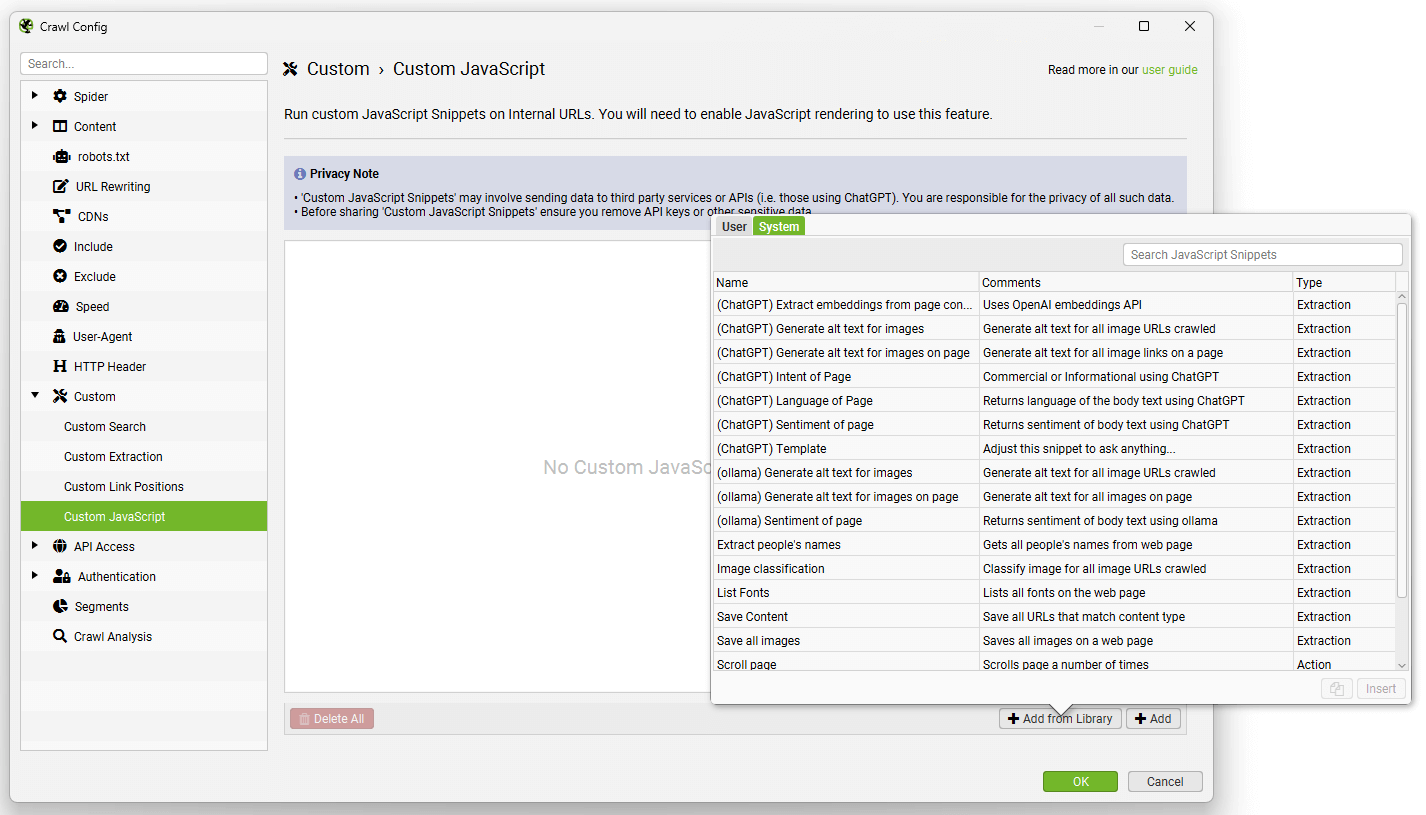 The snippet library ships with templates for alt text, sentiment, scrolling, mouseovers, embeddings and local downloads
Real-World Applications That Actually Move the Needle
Everything below has been tested in the JS snippet editor. Each snippet is an extraction snippet unless stated, and each one assumes JavaScript rendering mode is on.
1. Content structure signals at scale
Lists, tables and question-shaped headings are the formats that AI answers lift most cleanly, and a plain word count tells you nothing about them. This snippet reports words, average sentence length, the count of each structural element, and whether FAQPage markup is present in either JSON-LD or microdata:
const main = document.querySelector('main, article') || document.body;
const text = main.innerText || '';
const sentences = text.match(/[^.!?]+[.!?]+/g) || [];
const words = text.split(/\s+/).filter(Boolean).length;
const avgSentenceLength = sentences.length ? (words / sentences.length).toFixed(1) : '0';

const orderedLists = main.querySelectorAll('ol').length;
const bulletLists = main.querySelectorAll('ul').length;
const tables = main.querySelectorAll('table').length;

const jsonLd = Array.from(document.querySelectorAll('script[type="application/ld+json"]'))
  .map(script => script.textContent || '')
  .join(' ');
const hasFaq = /FAQPage/.test(jsonLd) || !!document.querySelector('[itemtype*="FAQPage"]');

return seoSpider.data([
  words,
  avgSentenceLength,
  orderedLists,
  bulletLists,
  tables,
  hasFaq ? 'Yes' : 'No'
]);
One 2026 caveat on that last column. Google stopped showing FAQ rich results on 7 May 2026 and removed them from the Rich Results Test in June, so FAQPage markup is now a structure signal for machines rather than a SERP feature. You do not need to strip it, but stop counting it as a win.
Export the tab, sort by words descending, and the pages with a thousand words and zero structure are the rewrite list. We tell clients that those are the pages most likely to be paraphrased by an AI answer without being cited, and our AI search optimisation work usually starts there.
2. Automated Image Alt Text Quality Checks
Standard crawls tell you which images lack alt text. They do not tell you that half the "alt text" is IMG_2041.jpg or the word "image". This snippet classifies each image once and returns a usable-alt score per page:
const images = Array.from(document.querySelectorAll('img'));
const counts = { total: images.length, missing: 0, empty: 0, filename: 0, generic: 0, ok: 0 };

images.forEach(img => {
  if (!img.hasAttribute('alt')) return counts.missing++;
  const alt = img.alt.trim();
  if (alt === '') return counts.empty++;
  if (/\.(jpe?g|png|gif|webp|avif|svg)$/i.test(alt)) return counts.filename++;
  if (/^(image|photo|picture|img|icon|logo|banner|untitled)\b/i.test(alt)) return counts.generic++;
  counts.ok++;
});

const score = counts.total ? Math.round((counts.ok / counts.total) * 100) : 100;

return seoSpider.data([
  counts.total,
  counts.missing,
  counts.empty,
  counts.filename,
  counts.generic,
  score + '%'
]);
Empty alt is counted separately because it is correct for decorative images and wrong for product shots, so read that column against the template. Sort by score ascending and fix templates, not individual pages. If you want the alt text written for you, the library's "generate alt text" snippet and the AI tab both do that, and our website audits use the same score to prioritise which templates get it first.
3. ChatGPT Integration for Content Insights
This is the section that has changed most since the feature launched, so here is the honest 2026 picture.
You no longer need custom JavaScript to run an LLM prompt during a crawl. Version 21.0 (November 2024) added direct OpenAI, Gemini and Ollama integrations under Config > API Access > AI, with results in a dedicated AI tab and up to 100 prompts per crawl. Version 22.0 (June 2025) added Anthropic, custom OpenAI-compatible endpoints, and the ability to run prompts against a segment or an issue filter rather than every URL. Version 24.0 (May 2026) added system-wide prompts, live validation of the model you picked against the provider's endpoint, and token usage tracking.
That integration works in every crawl mode, does not depend on rendering, and handles rate limiting for you. For "summarise this page", "classify the intent" or "write a meta description", use it, and pick a model from the provider's current list rather than the one in an old tutorial. As of this writing Anthropic's current models are Claude Sonnet 5 and Claude Opus 5 and OpenAI's are the GPT-5.6 family.
Custom JavaScript still earns its place when you need logic around the call: only send pages that fail another check, combine the LLM output with DOM data in one row, or write results to disk for a separate pipeline. The minimal working shape looks like this:
const apiKey = 'YOUR_OPENAI_API_KEY';
const model = 'gpt-5.6-luna'; // check the provider's current model list before crawling
const title = document.querySelector('h1')?.innerText || document.title;
const body = (document.querySelector('main, article') || document.body).innerText.slice(0, 4000);

const prompt = `You are auditing a web page for search intent fit.
Title: ${title}
Content: ${body}
Reply on one line as: PRIMARY_TOPIC | AUDIENCE | BIGGEST_GAP`;

return fetch('https://api.openai.com/v1/chat/completions', {
  method: 'POST',
  headers: {
    'Content-Type': 'application/json',
    'Authorization': `Bearer ${apiKey}`
  },
  body: JSON.stringify({
    model,
    messages: [{ role: 'user', content: prompt }]
  })
})
  .then(res => res.json())
  .then(json => seoSpider.data(json.choices[0].message.content.trim()))
  .catch(err => seoSpider.error(String(err)));
The failure you will hit first is not your code. Screaming Frog's debugging tutorial calls out the error "Refused to connect to 'https://api.openai.com/v1/chat/completions' because it violates the following Content Security Policy directive": the site you are crawling blocks outbound requests from the page. When that happens, switch to the AI tab, which calls the API from the Spider rather than from inside the page.
If the goal is batch analysis rather than live results, skip the API call entirely and write one JSON line per page with seoSpider.saveText(), then run the batch afterwards with whichever provider is cheapest that month. One line per URL, appended, is all a downstream script needs.
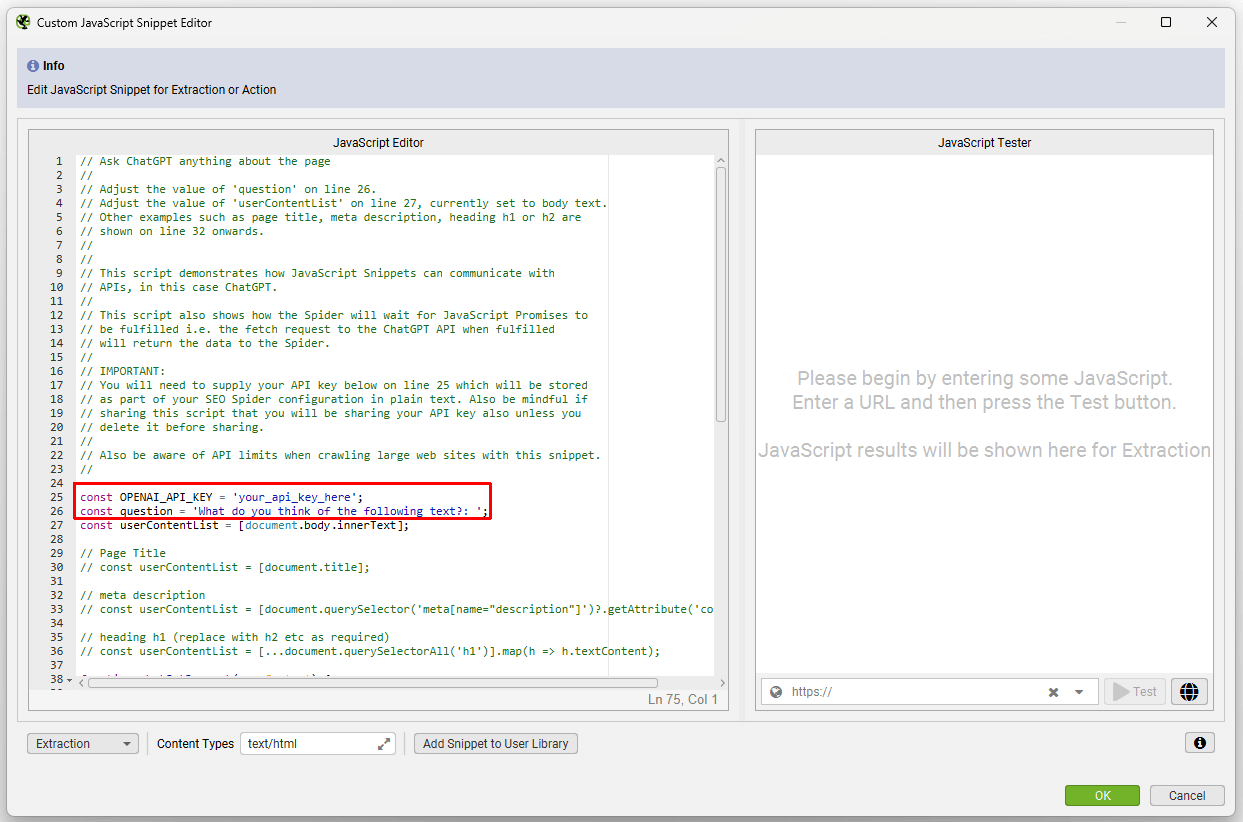 The library's LLM templates put the API key at the top of the snippet. Remove it before you export the library to share it
4. JSON-LD type inventory
The Structured Data tab validates markup. It does not give you a one-line answer to "what schema types does this template emit", which is the question every migration and every schema markup rollout needs. This snippet collects every top-level @type, including inside @graph, and counts blocks that fail to parse:
const types = new Set();
const collect = node => {
  if (!node || typeof node !== 'object') return;
  if (Array.isArray(node)) return node.forEach(collect);
  if (node['@type']) [].concat(node['@type']).forEach(type => types.add(type));
  if (node['@graph']) collect(node['@graph']);
};

let invalid = 0;
document.querySelectorAll('script[type="application/ld+json"]').forEach(script => {
  try {
    collect(JSON.parse(script.textContent));
  } catch (e) {
    invalid++;
  }
});

return seoSpider.data([
  types.size ? Array.from(types).sort().join(', ') : 'None',
  invalid
]);
Run it on a rendered crawl and a non-rendered crawl and diff the columns. Schema that only appears after render is schema the AI crawlers never see, for the reasons covered in the JavaScript SEO guide.
5. Pages with no visible H1 after render
A page can have an H1 in the HTML and still show none, because a hydration step hides it, a CSS class collapses it, or the hero component swaps it for an image. The standard H1 column cannot tell the difference. This one can:
const isVisible = el => {
  const style = window.getComputedStyle(el);
  const rect = el.getBoundingClientRect();
  return style.display !== 'none' &&
    style.visibility !== 'hidden' &&
    parseFloat(style.opacity) !== 0 &&
    rect.width > 0 && rect.height > 0 &&
    el.innerText.trim().length > 0;
};

const h1s = Array.from(document.querySelectorAll('h1'));
const visible = h1s.filter(isVisible);

return seoSpider.data([
  h1s.length,
  visible.length,
  visible.length ? visible[0].innerText.trim().slice(0, 120) : 'NO VISIBLE H1'
]);
Filter on "NO VISIBLE H1" and group by template. In our experience it is almost always one component, fixed once.
6. Content hidden behind "read more" toggles
Google can index text that is in the DOM but collapsed. The problem is the other pattern, where the toggle fetches the rest of the copy on click, because Google's own guidance is that Search does not interact with your page. This snippet measures how much of the main content is hidden at render time and how many collapsed controls are on the page:
const root = document.querySelector('main, article') || document.body;
const skip = new Set(['SCRIPT', 'STYLE', 'NOSCRIPT', 'TEMPLATE', 'NAV', 'FOOTER', 'HEADER']);
let visibleChars = 0;
let hiddenChars = 0;

const walk = (el, hiddenAncestor) => {
  if (skip.has(el.tagName)) return;
  const style = window.getComputedStyle(el);
  const hidden = hiddenAncestor || el.hidden || style.display === 'none' || style.visibility === 'hidden';
  Array.from(el.childNodes).forEach(node => {
    if (node.nodeType === Node.TEXT_NODE) {
      const length = node.textContent.trim().length;
      if (hidden) { hiddenChars += length; } else { visibleChars += length; }
    } else if (node.nodeType === Node.ELEMENT_NODE) {
      walk(node, hidden);
    }
  });
};

walk(root, false);
const total = visibleChars + hiddenChars;
const hiddenShare = total ? Math.round((hiddenChars / total) * 100) : 0;
const toggles = root.querySelectorAll('[aria-expanded="false"], details:not([open])').length;

return seoSpider.data([visibleChars, hiddenChars, hiddenShare + '%', toggles]);
A high hidden share with the text present is a UX decision. A page with toggles, a low visible count and nothing hidden means the copy is loaded on click and does not exist for any crawler. That second group is the one to fix.
Setting Up Your First Custom JavaScript Audit
The setup takes five minutes. The part that costs people an afternoon is skipping step one.
- Turn on rendering at Config > Spider > Rendering > JavaScript. Custom JavaScript needs the rendered page, and it does nothing useful without it.
- Open Config > Custom > Custom JavaScript and click Add, or Add from Library to start from a template.
- Choose Extraction or Action. Action snippets need a timeout in seconds.
- Paste your code, then click the JS box next to the snippet to open the editor. Enter a URL in the bottom right and press Test to see the returned data, or an error, in the tester panel.
- If the tester shows an error you cannot read, tick External Browser, press Test again and open Developer Tools in the Chromium window that appears. Your
console.log()output lands in its Console tab. - Set a content type filter so the snippet only runs on HTML, not on PDFs and images.
- Crawl a few hundred URLs, check the Custom JavaScript tab, then run the full site.
Pitfalls, from the ones we have hit ourselves:
| Pitfall | What happens | Fix |
|---|---|---|
No return |
The column is empty for every URL | End with return seoSpider.data(...) |
| Sync code for async work | Data returns before the fetch resolves | Return the Promise chain |
| Many snippets on one crawl | Crawl speed drops sharply | Split heavy snippets into separate crawls |
| Site blocks outbound fetch | CSP error in the tester | Use the AI tab or the save-and-batch approach |
| Selectors from the raw HTML | Nothing matches after hydration | Write selectors against the rendered DOM in the External Browser |
Advanced Techniques We Use Daily
Scrolling to trigger lazy content
An action snippet that scrolls to the bottom in stages, so lazy-loaded sections and infinite scroll chunks exist before extraction snippets run. The library ships a version of this; ours is shorter:
let scrollCount = 0;
const maxScrolls = 10;

const scrollInterval = setInterval(() => {
  window.scrollTo(0, document.body.scrollHeight);
  scrollCount++;
  if (scrollCount >= maxScrolls) {
    clearInterval(scrollInterval);
  }
}, 1000);

// Set the action snippet timeout to at least 15 seconds
Because action snippets run first, the H1 and hidden-content snippets above then see the scrolled page.
Font and preconnect check
A small pre-assessment for the Core Web Vitals conversation, and an example of returning after a Promise resolves:
const images = Array.from(document.querySelectorAll('img'));
const lazyImages = images.filter(img => img.loading === 'lazy' || img.dataset.src).length;
const preconnects = document.querySelectorAll('link[rel="preconnect"]').length;

return document.fonts.ready.then(() => {
  return seoSpider.data([
    images.length,
    lazyImages,
    document.fonts.size,
    preconnects
  ]);
});
Writing a dataset to disk
seoSpider.saveText() with shouldAppend set to true builds a JSONL file across the crawl. We use it to hand rendered text to a separate script, whether that is a batch LLM job or a check through our AI-generated text detector for content that was bought in bulk:
const text = (document.querySelector('main, article') || document.body).innerText.slice(0, 20000);
const line = JSON.stringify({ url: window.location.href, text }) + '\n';

return seoSpider.saveText(line, '/Users/you/crawl-exports/page-text.jsonl', true);
Combining with the AI tab and the MCP
The cleanest 2026 workflow is custom JavaScript for DOM facts, the AI tab for judgement calls on the pages that fail, and the SEO Spider MCP added in version 24 to run and export the crawl from an AI assistant. The snippet finds the 300 pages with no visible H1; the prompt drafts a replacement for each; the MCP hands the export to whoever is fixing it.
Measuring Success: What to Track
Custom snippets produce columns, and columns are only useful if someone acts on them. When we run this in website audits, the tracking is deliberately simple:
| Metric | How to measure it | Why it matters |
|---|---|---|
| Templates affected, not URLs | Group the Custom JavaScript export by URL pattern | One template fix clears thousands of rows |
| Rendered vs raw gap | Diff the same snippet on a rendered and a non-rendered crawl | Everything in the gap is invisible to AI crawlers |
| Re-crawl delta | Compare crawls after each release (version 24 automates this for scheduled crawls) | Regressions are more common than new problems |
| Time from finding to fix | Ticket date to deploy date | The crawl is cheap; the bottleneck is always development time |
We do not attach ranking numbers to snippet results, because a snippet finds a problem and the ranking change depends on everything else that happened that month. The honest claim is that rendered-DOM checks find issues a standard crawl cannot, and that fixing template-level problems is the highest-yield technical work on a JavaScript site.
Your Next Steps
- Turn on JavaScript rendering and run the visible H1 snippet on your top templates. It is the fastest way to learn whether hydration is changing your pages.
- Run the JSON-LD inventory on a rendered and a non-rendered crawl and compare the columns.
- Move any LLM prompt that does not need custom logic to the AI tab, and update the model name to one the provider currently lists.
- Keep a snippet library file per client and export it without the API keys, in the same way you would keep reusable SEO templates for recurring work.
- For a single page you are looking at right now, our Chrome SEO audit extension covers the same on-page ground without a crawl.
Screaming Frog is still the crawler. Custom JavaScript turns it into a way of asking your own questions of every rendered page on the site, and in 2026, with AI crawlers reading raw HTML and Google reading the rendered DOM, knowing the difference between the two is most of the job. If you would like us to run this against your site, our technical SEO service does exactly that, and a free SEO review is a reasonable place to start. If you have a better snippet than any of these, send it over; we will happily steal it.