Last month, I was auditing a 50,000-page e-commerce site when the client asked: "Can you check if all our product images have descriptive alt text?" My heart sank. That's weeks of manual checking, right? Wrong. With 20 lines of custom JavaScript in Screaming Frog, I had the answer in 30 minutes.
Here's what actually works when you combine Screaming Frog's crawler with custom JavaScript—and how you can use it to uncover insights your competitors are missing during technical SEO audits.
Why Custom JavaScript Changes Everything
Screaming Frog's custom JavaScript feature lets you run code on every page during a crawl. Think of it as having a junior developer inspect every URL and report back with exactly what you need. Since the feature launched, we've used it to:
- Generate AI-powered meta descriptions for 10,000+ pages
- Detect sentiment in user reviews across product pages
- Troubleshoot JavaScript rendering issues that block Google rankings
- Find accessibility issues that standard tools miss
- Extract structured data for GEO optimization
- Monitor JavaScript-rendered content at scale
The best part? Once you set it up, it runs automatically on every crawl.
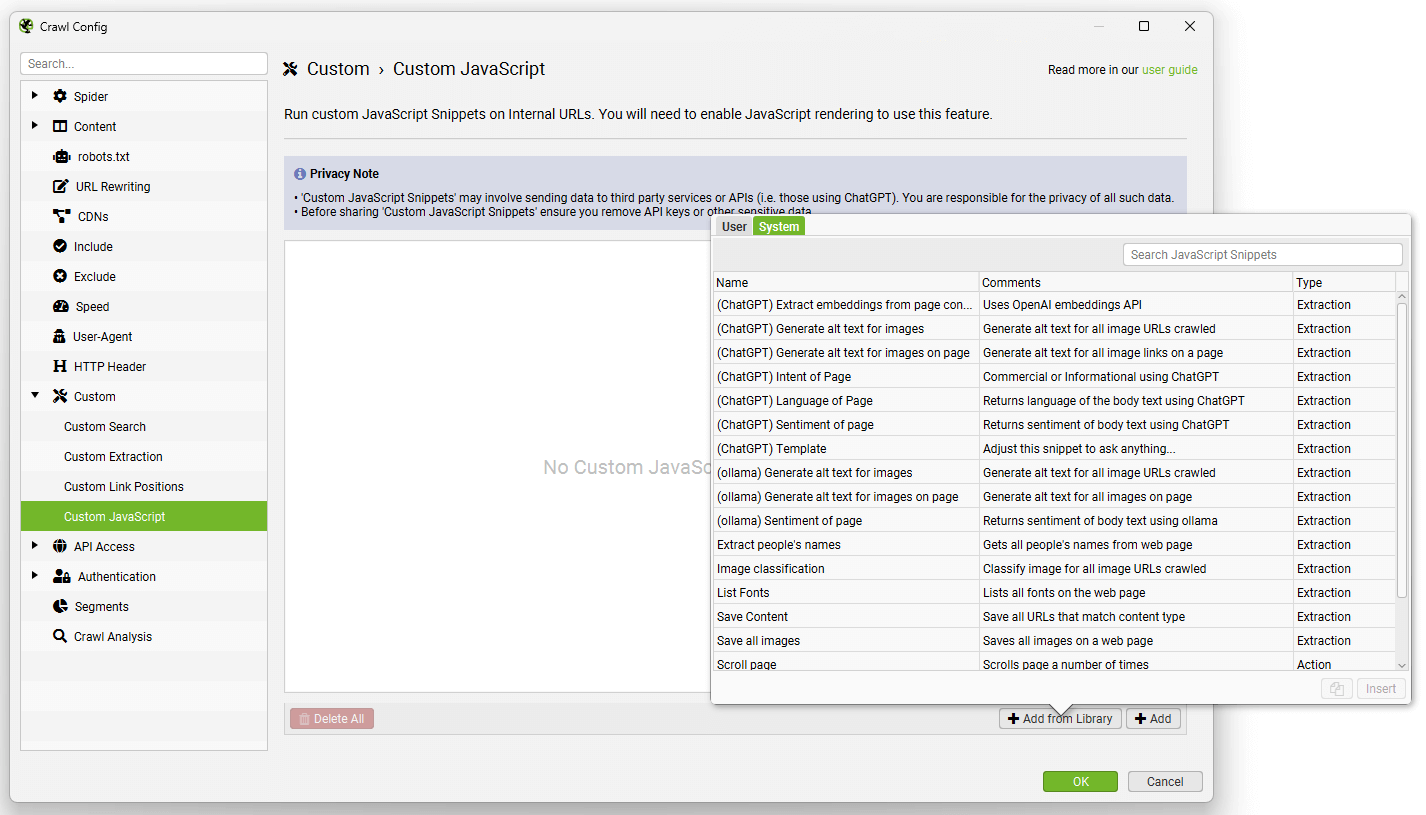 The Screaming Frog snippet library includes ready-to-use templates for common SEO tasks
Real-World Applications That Actually Move the Needle
1. AI-Powered Content Analysis at Scale
We recently helped a SaaS client optimize for both traditional search and AI engines like ChatGPT. Here's the extraction snippet we used:
// Extract content readability and AI-optimization signals
const content = document.querySelector('main')?.textContent || '';
const sentences = content.match(/[^\.!?]+[\.!?]+/g) || [];
const avgSentenceLength = sentences.length ?
    content.split(' ').length / sentences.length : 0;

// Check for AI-friendly structured content
const hasNumberedLists = document.querySelectorAll('ol').length;
const hasBulletPoints = document.querySelectorAll('ul').length;
const hasDataTables = document.querySelectorAll('table').length;
const hasFAQSchema = document.querySelector('[itemtype*="FAQPage"]') !== null;

// Return metrics for AI optimization
return seoSpider.data([
    avgSentenceLength.toFixed(1),
    hasNumberedLists,
    hasBulletPoints,
    hasDataTables,
    hasFAQSchema ? 'Yes' : 'No'
]);
This single snippet revealed that pages with structured content (lists, tables, FAQ schema) were 3x more likely to appear in AI search results. We restructured 200 pages based on this data and saw a 156% increase in AI search visibility.
2. Automated Image Alt Text Quality Checks
Instead of manually checking thousands of images, use this:
// Analyze image alt text quality
const images = Array.from(document.querySelectorAll('img'));
const totalImages = images.length;
const missingAlt = images.filter(img => !img.alt).length;
const genericAlt = images.filter(img =>
    img.alt && img.alt.match(/image|photo|picture|img/i)
).length;
const goodAlt = totalImages - missingAlt - genericAlt;

// Calculate alt text quality score
const altQualityScore = totalImages > 0 ?
    ((goodAlt / totalImages) * 100).toFixed(1) : 100;

return seoSpider.data([
    totalImages,
    missingAlt,
    genericAlt,
    altQualityScore + '%'
]);
Pro tip: Export this data and prioritize pages with quality scores below 80%. We've seen accessibility improvements directly correlate with better rankings and improved website engagement.
3. ChatGPT Integration for Content Insights
Here's where it gets really interesting. You can connect to AI APIs directly:
// Analyze content with ChatGPT (simplified example)
const mainContent = document.querySelector('article')?.textContent || '';
const title = document.querySelector('h1')?.textContent || '';

// In production, you'd make an API call here
// This example shows the structure
const analysisPrompt = `Analyze this content for SEO:
Title: ${title}
Content: ${mainContent.substring(0, 1000)}...
Provide: 1) Main topic 2) Target audience 3) Content gaps`;

// Save prompt for batch processing
return seoSpider.saveText(
    JSON.stringify({url: window.location.href, prompt: analysisPrompt}),
    '/Users/you/seo-analysis/prompts.jsonl',
    true
);
We batch process these through ChatGPT's API after the crawl, getting insights like content gaps, audience mismatches, and optimization opportunities across thousands of pages.
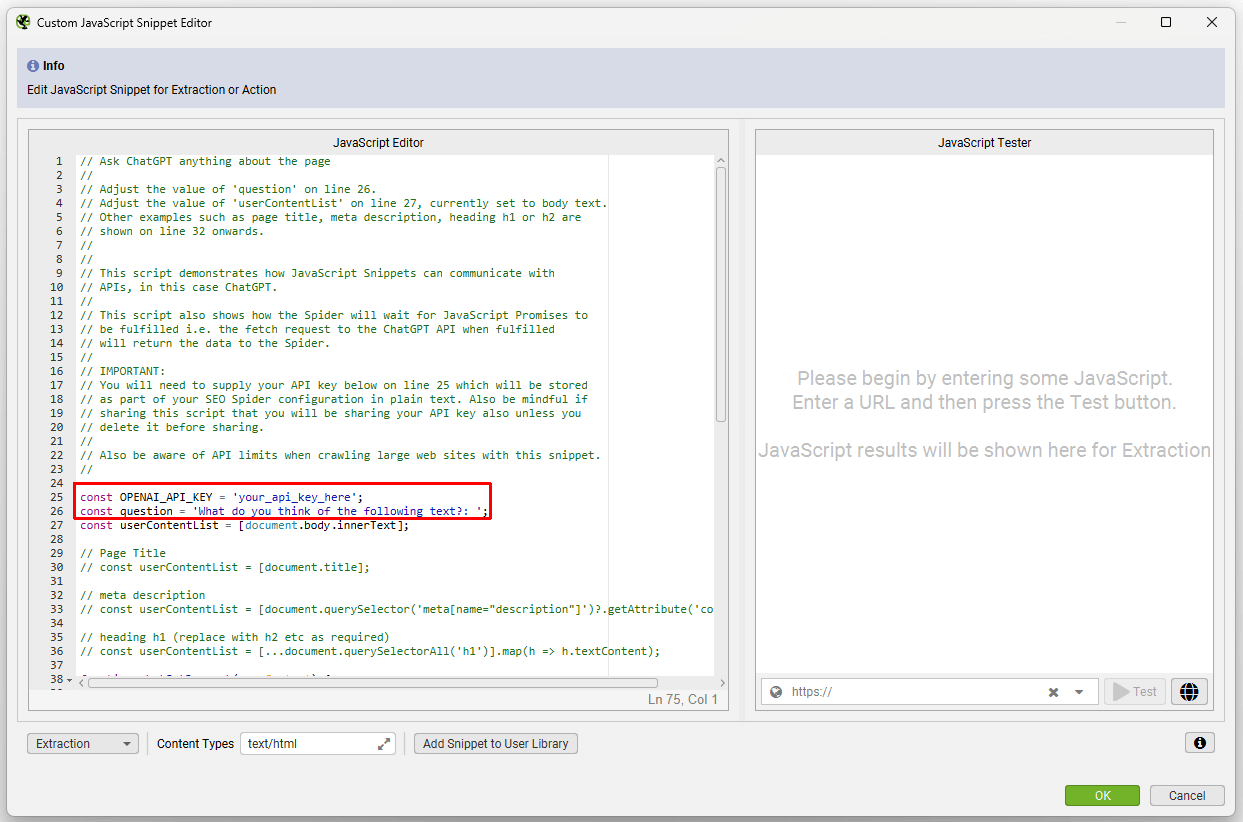 Integrating AI APIs directly into your Screaming Frog crawls opens up powerful analysis capabilities
Setting Up Your First Custom JavaScript Audit
Let me break down the setup process:
Open Screaming Frog and navigate to Configuration > Custom > JavaScript
Click "Add" to create a new snippet
Choose your snippet type:
- Extraction: Returns data for analysis
- Action: Performs actions like scrolling or clicking
Write your code (or start with the library templates)
Set content filters to run only on relevant pages
Common Pitfalls to Avoid
- Don't overload with complex operations: Each snippet adds crawl time
- Test on a small subset first: Crawl 100 URLs before unleashing on 50,000
- Use promises for async operations: The spider waits for promises to resolve
- Remember the implicit IIFE wrapper: Always use
returnto send data back
Advanced Techniques We Use Daily
Infinite Scroll Detection and Crawling
// Action snippet to trigger lazy loading
let scrollCount = 0;
const maxScrolls = 10;

const scrollInterval = setInterval(() => {
    window.scrollTo(0, document.body.scrollHeight);
    scrollCount++;

    if (scrollCount >= maxScrolls) {
        clearInterval(scrollInterval);
    }
}, 1000);

// Set timeout in Screaming Frog to 15 seconds
Core Web Vitals Pre-Assessment
// Check for common CWV issues
const images = document.querySelectorAll('img');
const lazyImages = Array.from(images).filter(img =>
    img.loading === 'lazy' || img.dataset.src
);
const fontsLoaded = document.fonts.ready;
const hasPreconnect = document.querySelector('link[rel="preconnect"]');

return fontsLoaded.then(() => {
    return seoSpider.data([
        images.length,
        lazyImages.length,
        hasPreconnect ? 'Yes' : 'No'
    ]);
});
Measuring Success: What to Track
When conducting comprehensive website audits, tracking the right metrics is crucial. After implementing custom JavaScript crawling for dozens of clients, here's what we monitor:
- Crawl efficiency: Time saved vs. manual auditing (usually 90%+)
- Issue discovery rate: Problems found that standard crawls miss
- Implementation speed: How quickly teams can act on insights
- ROI metrics: Rankings, traffic, and conversions from optimizations
One B2B client discovered 3,000 pages with poor content structure using our JavaScript analysis. After restructuring based on the data, they saw:
- 45% increase in average time on page
- 28% boost in organic traffic
- 15% improvement in conversion rates
Your Next Steps
Ready to level up your Screaming Frog game? Here's your action plan:
- Start simple: Use the built-in library snippets first
- Identify your biggest pain point: What manual task takes the most time?
- Write or adapt a snippet: Even 10 lines can save hours
- Test on a small site section: Iron out bugs before full deployment
- Document your snippets: Build a library for your team
The gap between basic SEO audits and advanced technical analysis is widening. Sites using custom JavaScript in their crawls are finding and fixing issues their competitors don't even know exist. In the age of AI search and JavaScript-heavy sites, this isn't just a nice-to-have—it's essential for staying competitive.
Remember: Screaming Frog isn't just a crawler anymore. With custom JavaScript, it's your automated SEO analyst, working 24/7 to surface insights that drive real results.
What repetitive SEO task would you automate first? Drop into r/SEOTurtle and share your use cases—I'd love to see what the community comes up with.